Markorax
GRID PACKLINE
GRID PACKLINE
Couldn't load pickup availability
Self-paced learning overview
- 📥 Digital file available after purchase
- ♾️ Long-term availability
- 🔒 Secure checkout
- 🗓️ Content updated in 2026
1. Problem Statement
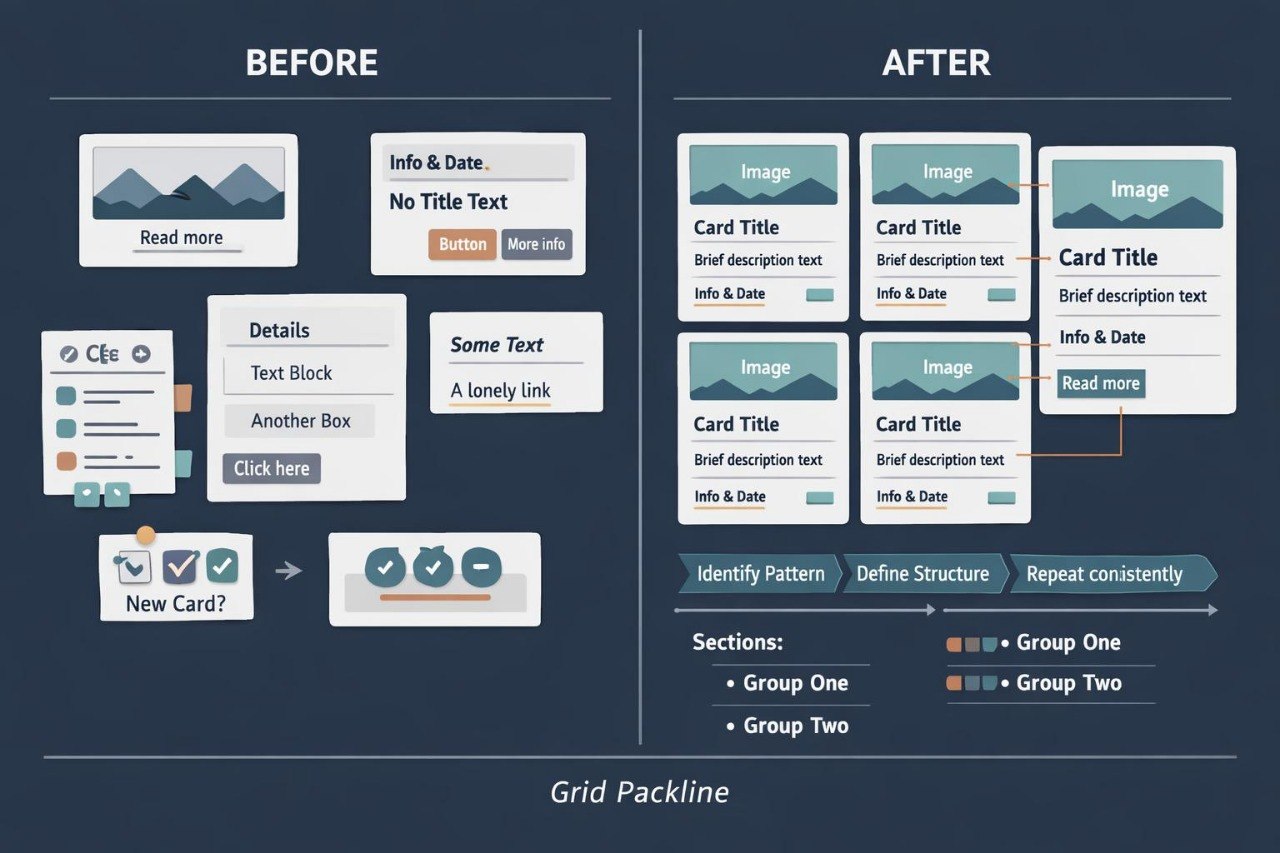
Struggling to maintain order in an HTML document containing many similar cards, descriptions, links, and images? You are not alone: repeated content often leads to unnecessary containers, inconsistent naming, and confusing nesting. Individual blocks may appear similar while following different internal structures, making them harder to compare and revise. Without a defined markup pattern, every new item requires the same structural decisions to be made again. As the document expands, its organization can become less consistent and more difficult to review.
2. Solution
This course will teach you how to create repeated HTML components using a consistent structural pattern. You will examine ways to organize card collections, thematic lists, resource directories, and sections containing several related items. The course explains which parts of a block should remain consistent and which may change according to the content. Practical assignments guide you through comparing structures, reducing unnecessary nesting, and maintaining consistent element order. The final project combines several content groups within one organized multi-section page.
3. What’s Inside
Module 1: Repeating Content Patterns
You will identify repeated page elements and describe them through a shared HTML structure.
Module 2: Building Content Cards
This module covers cards containing headings, descriptions, images, metadata, and related links.
Module 3: Lists, Groups, and Collections
You will use lists to organize connected materials and decide when content belongs in a list, section, or separate article.
Module 4: Consistent Element Order
You will maintain the same order of headings, text, images, and links throughout repeated components.
Module 5: Figures and Captions
This module explains the figure and figcaption elements and the relationship between visual material and its description.
Module 6: Metadata and Supporting Details
You will organize dates, categories, short notes, author details, and other supporting information.
Module 7: Reducing Unnecessary Nesting
You will review examples containing excessive containers and rewrite them using a more consistent structure.
Module 8: Collection Navigation
This module covers page contents, links between thematic groups, and references to individual resources.
Module 9: Final Structured Collection
You will build a page containing several sections, repeated cards, captioned images, and organized navigation.
4. Who Is This For?
✅ Suitable if you:
- understand foundational and semantic HTML structure;
- work with pages containing repeated content;
- want to create consistent cards and thematic collections;
- want to reduce unnecessary markup nesting;
- plan to improve the organization of larger HTML documents.
❌ Not suitable if you:
- have not yet studied commonly used HTML tags;
- are looking only for visual styling materials;
- do not plan to analyze and rewrite examples;
- require server-side data processing subjects.
5. What You’ll Learn
- Identify repeated content patterns.
- Create cards using one consistent structural model.
- Organize a collection containing at least six items.
- Connect images with relevant captions.
- Add metadata without disrupting the primary hierarchy.
- Maintain the same element order across repeated blocks.
- Reduce unnecessary levels of nesting.
- Create navigation between thematic sections.
- Review heading consistency in larger collections.
- Build a complete page containing several groups of repeated content.
6. Refund Policy
A refund request may be submitted within 30 calendar days of the course purchase date. Each request is reviewed according to the terms published on the Markorax website, including the amount of material already completed and other stated conditions.
7. Certificate
After completing all modules and the final assignment, the learner receives a Markorax certificate. The certificate records the course title and the primary subjects covered during the program.
1. How are the courses organized?
1. How are the courses organized?
Each course contains ordered modules, written explanations, HTML markup examples, practical exercises, and final assignments. Learners can study at their own pace and return to earlier topics whenever additional review is needed.
2. Is previous web development experience required?
2. Is previous web development experience required?
Previous experience is not required for the introductory plans. Later collections are intended for learners who already understand basic HTML tags and want to work with larger page structures.
3. How do the plans differ?
3. How do the plans differ?
The plans follow a gradual progression in material volume, module count, and assignment complexity. Introductory options cover foundational topics, while later collections examine semantic structure, forms, tables, multi-page projects, and more detailed markup organization.
4. Is a certificate included?
4. Is a certificate included?
Yes. After completing the required modules and final assignments, the learner receives a Markorax certificate. It records the completed course and the main subjects covered in the program.
Share