Markorax
SLATE FRAMEWORK
SLATE FRAMEWORK
Couldn't load pickup availability
Self-paced learning overview
- 📥 Digital file available after purchase
- ♾️ Long-term availability
- 🔒 Secure checkout
- 🗓️ Content updated in 2026
1. Problem Statement
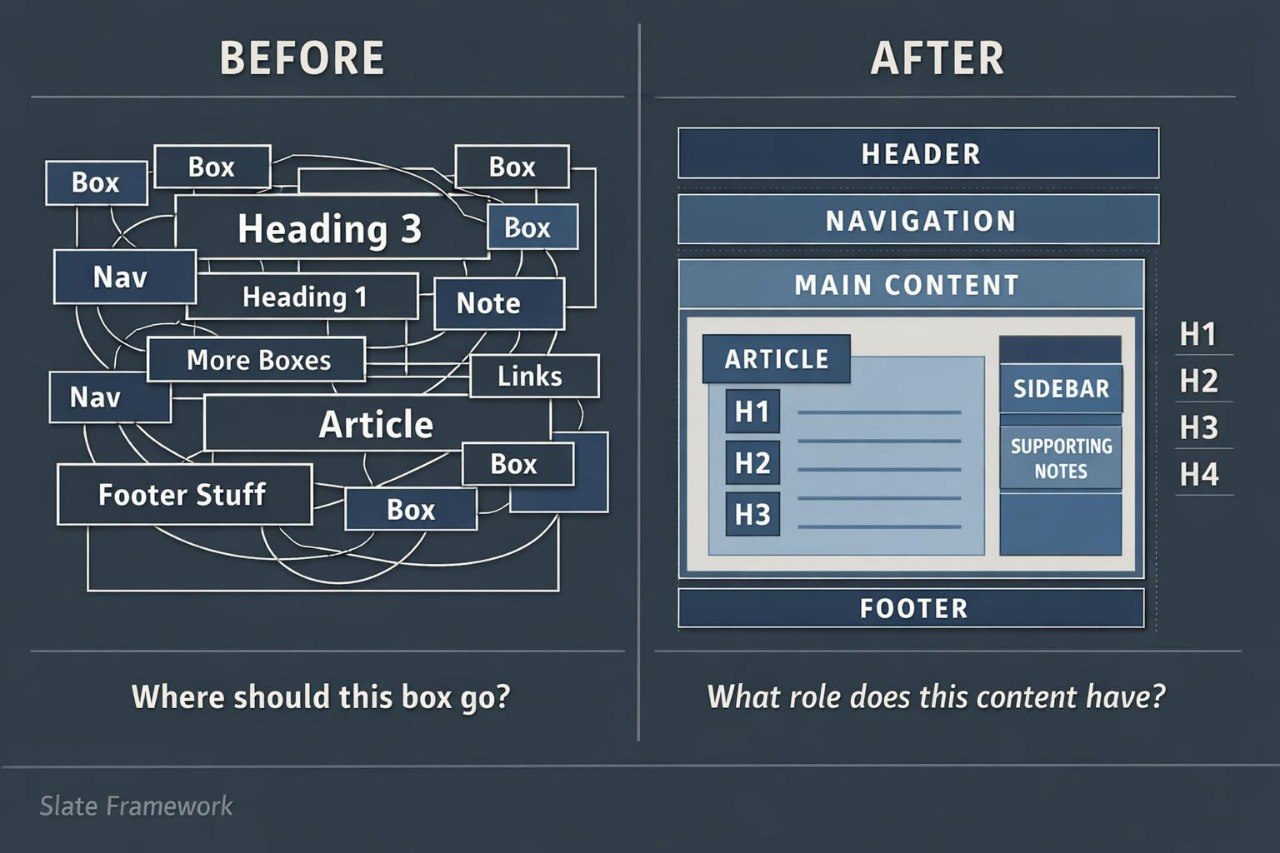
Struggling to organize an HTML page containing several text areas, links, images, and thematic blocks? You are not alone: after learning basic tags, many learners are unsure how content should be divided between page sections. Without a defined structure, a document may contain unnecessary containers, inconsistent headings, and elements without a clear role. This makes the markup more difficult to review, correct, and extend. The issue becomes particularly noticeable when a page includes navigation, primary material, supporting information, and a footer.
2. Solution
This course will teach you how to build HTML documents around logical and semantic regions. You will examine elements used for headers, navigation, primary content, articles, supporting blocks, and footers. The materials explain how to select an element according to the meaning of its content rather than its visual position alone. Practical exercises guide you through comparing alternative structures and correcting common markup issues. The final assignment brings these topics together in a multi-section informational page with a consistent hierarchy.
3. What’s Inside
Module 1: From Basic Tags to Page Structure
You will review the foundation of an HTML document and see how individual elements form larger content groups.
Module 2: Semantic Page Regions
This module covers header, nav, main, section, article, aside, and footer, including the distinct role of each element.
Module 3: Heading Hierarchy
You will arrange headings in a consistent order, separate primary and nested subjects, and avoid irregular changes between heading levels.
Module 4: Organizing Articles and Sections
You will examine when content belongs in an article, a thematic section, or a general group of elements.
Module 5: Navigation Structures
This module explains primary menus, internal links, section references, and connections between several HTML documents.
Module 6: Supporting Content
You will organize notes, related materials, quotations, captions, and supplementary information without disrupting the primary document flow.
Module 7: Structure Review and Correction
You will analyze examples containing unclear semantics, unnecessary containers, incorrect nesting, and inconsistent headings.
Module 8: Final Multi-Section Page
The final assignment involves creating a page with a header, navigation menu, main article, thematic sections, supporting content, and a footer.
4. Who Is This For?
✅ Suitable if you:
- already understand commonly used HTML tags;
- want to organize larger amounts of page content;
- want to understand semantic element roles;
- create pages containing several sections;
- want to improve the readability of your markup.
❌ Not suitable if you:
- have not yet studied basic HTML document structure;
- are looking for visual page styling materials;
- do not plan to complete practical assignments;
- require server-side logic or database subjects.
5. What You’ll Learn
- Distinguish the primary semantic regions of an HTML page.
- Select elements according to their content role.
- Build a heading hierarchy containing at least three levels.
- Create navigation between pages and individual sections.
- Organize articles, thematic groups, and supporting content.
- Reduce unnecessary general-purpose containers.
- Identify and correct nesting issues.
- Review a document structure before extending it.
- Build a complete page containing at least six semantic regions.
- Prepare markup that is easier to read and revise.
6. Refund Policy
A refund request may be submitted within 30 calendar days of the purchase date. Each request is reviewed according to the terms published on the Markorax website, including the amount of material already completed and other stated eligibility conditions.
7. Certificate
After completing all required modules and the final assignment, the learner receives a Markorax certificate. The document records the course title and the main subjects covered.
1. How are the courses organized?
1. How are the courses organized?
Each course contains ordered modules, written explanations, HTML markup examples, practical exercises, and final assignments. Learners can study at their own pace and return to earlier topics whenever additional review is needed.
2. Is previous web development experience required?
2. Is previous web development experience required?
Previous experience is not required for the introductory plans. Later collections are intended for learners who already understand basic HTML tags and want to work with larger page structures.
3. How do the plans differ?
3. How do the plans differ?
The plans follow a gradual progression in material volume, module count, and assignment complexity. Introductory options cover foundational topics, while later collections examine semantic structure, forms, tables, multi-page projects, and more detailed markup organization.
4. Is a certificate included?
4. Is a certificate included?
Yes. After completing the required modules and final assignments, the learner receives a Markorax certificate. It records the completed course and the main subjects covered in the program.
Share